


Quick Answer
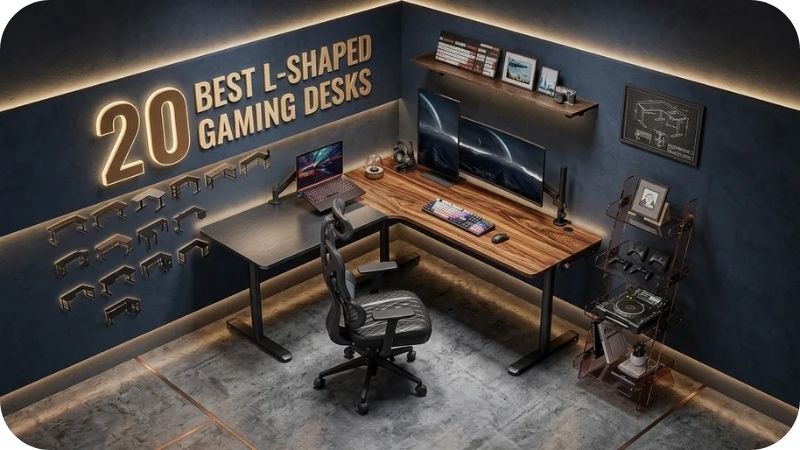
The best L shaped gaming desks offer a corner configuration that maximises surface area, supports dual or triple monitor setups, and fits room corners efficiently. Top features to look for are a minimum 120×120cm total surface, sturdy MDF or steel frame, cable management, and either built-in drawers or monitor shelves. Prices in Pakistan range from PKR 25,000 to PKR 150,000+.
Why an L Shaped Gaming Desk Changes Everything About Your Setup
Most gamers outgrow a standard rectangular desk faster than they expect. You add a second monitor, then a headset stand, then a controller dock, then the microphone arm — and suddenly there is no room left to actually use the desk comfortably.
An L shaped gaming desk solves this by using the corner of the room — space that usually sits completely wasted. You get two full work surfaces joined at a 90-degree angle, giving you separate zones for gaming and work, streaming and reference, or primary and secondary screens.
After fitting out dozens of gaming rooms and home offices across Pakistan, the most consistent feedback I get from clients who upgrade to an L shaped desk is that they wished they had done it sooner. The corner positioning also means the desk feels like a dedicated space — not just a table pushed against a wall.
This guide covers 20 specific designs — from budget Pakistani builds to premium imports — with honest sizing guidance, material recommendations, and everything competitors are not telling you about choosing the right L shaped gaming desk.
What Is an L Shaped Gaming Desk and Why Do Gamers Choose It?
An L shaped gaming desk is a corner desk with two surface extensions meeting at a 90-degree angle. One side handles the primary monitor and keyboard setup. The other side takes secondary equipment — a second monitor, streaming controls, documents, or simply extra working space.
Gamers choose L shaped desks because the corner angle places the primary monitor directly in front of you while the secondary surface remains reachable without turning. This reduces the constant rotation and stretching that causes neck and shoulder fatigue during long sessions.
The corner position also makes the setup feel immersive and contained — important for focus. Rather than looking at a wall or room beyond the desk, you are looking into a dedicated workspace that surrounds you slightly, which many gamers find genuinely helps concentration.
Setting Up the Full Room
Home Office Ideas — Complete Gaming and Work Setup Inspiration
What Are the Different Types of L Shaped Gaming Desks?
Standard Corner L Desk
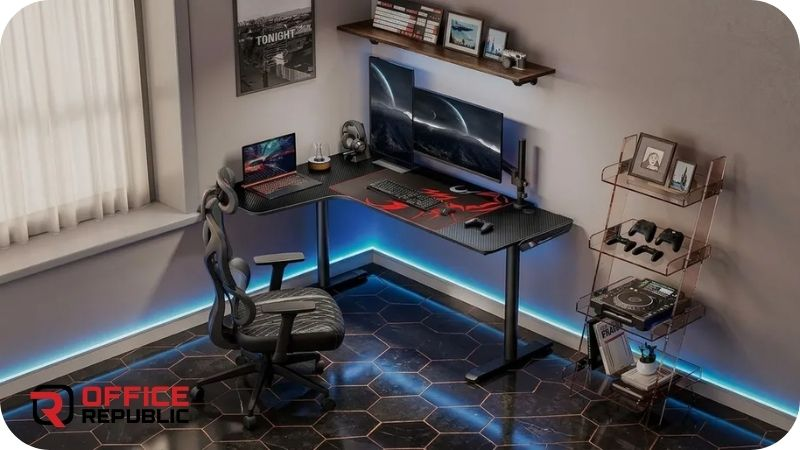
Two flat surface panels joined at 90 degrees with no built-in storage. Clean, minimal, and the most common configuration. Works best with separate monitor arms and freestanding storage.
L Desk With Integrated Drawers
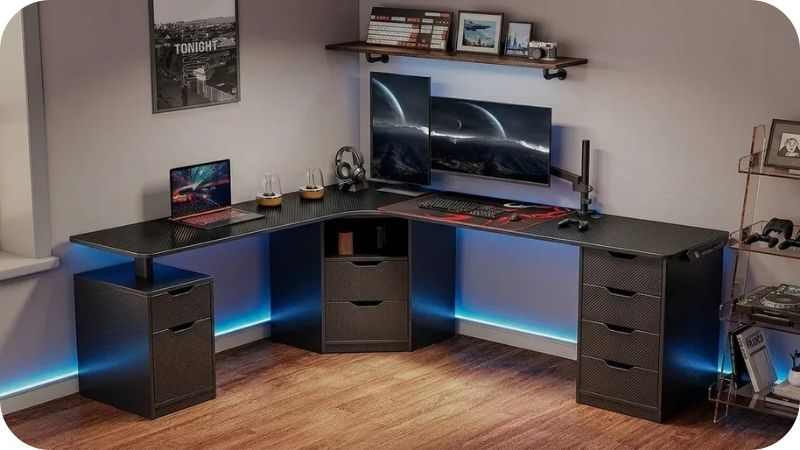
A standard L configuration with a drawer unit built into the corner section or one of the side panels. Keeps controllers, cables, accessories, and documents off the desk surface and organised underneath.
L Desk With Monitor Shelf or Hutch
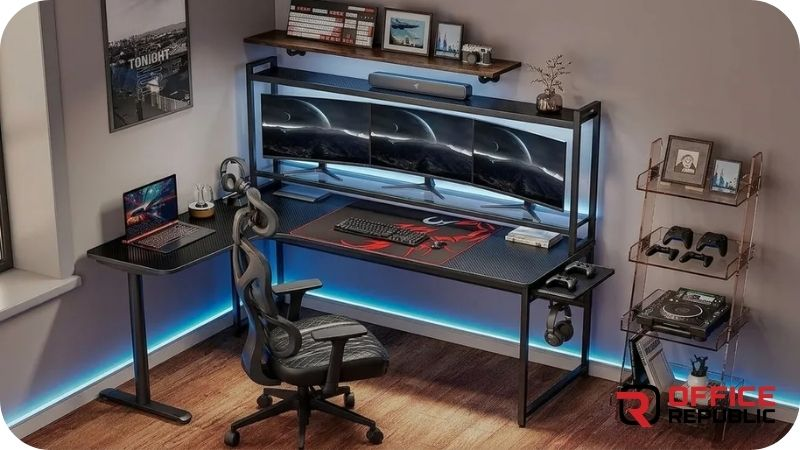
Has a raised shelf section above the primary surface for monitors, speakers, or decorative items. Keeps the desk surface clear while adding vertical display space. Very popular in gaming setups shown on social media.
L Desk With LED Lighting
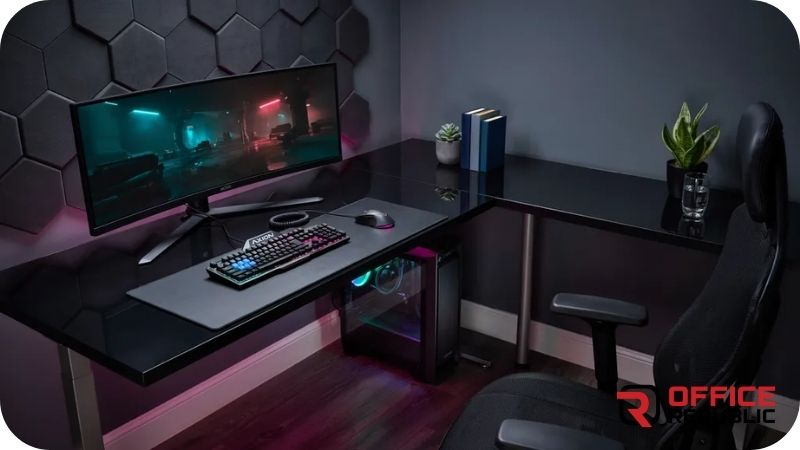
A standard or drawer-equipped L desk with LED strips built into the underside of the surface, the legs, or the monitor shelf. Creates the RGB ambience that is now a standard part of gaming room aesthetics.
Custom-Built L Gaming Desk
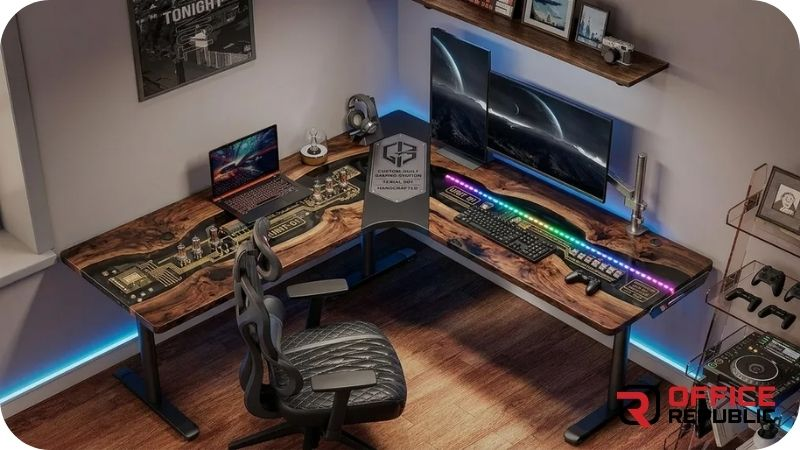
Fully fabricated to a specific room measurement and specification — exact dimensions, chosen materials, drawer count, surface height, leg style, and cable management routing all specified by the client. The best option for rooms with awkward dimensions or specific requirements.
Build the Whole Den Around It
Man Cave Office Ideas — Gaming Room Design That Actually Works
What Size L Shaped Gaming Desk Do You Actually Need?
This is the question most buyers get wrong. They measure the corner and assume whatever fits is fine. The real question is what surface area your setup requires — not just what fits in the room.
Minimum viable: 120×120cm total (60+60 on each arm). Works for a single monitor, keyboard, mouse, and minimal accessories.
Comfortable for dual monitors: 140×120cm or 120×140cm. Gives enough horizontal run for two monitors side by side on one arm while keeping the secondary arm clear.
Triple monitor or streaming setup: 160×140cm minimum. One full arm for the triple monitor rig, second arm for stream deck, microphone, and reference screen.
Depth matters too. Standard gaming desk depth is 60–70cm. Less than 60cm and monitors sit too close. More than 80cm and the back of the desk becomes hard to reach without leaning.
Expert Tip
Before buying or building any L shaped desk, physically tape out the dimensions on your floor using masking tape. Live with the tape outline for one day. Sit in your gaming chair inside the taped zone and reach every corner. This one step has saved dozens of my clients from buying a desk that technically fits the room but feels wrong to actually use.
Which Side Should Your L Shaped Desk Face — Left or Right?
This is one of the most overlooked decisions in gaming desk setup. An L shaped desk is not symmetrical — one arm is your primary and one is your secondary. Which way the L opens determines how you move throughout the day.
Right-hand configuration: The longer or primary arm is on the right. Works best for right-handed mouse users who want the most critical equipment within dominant-hand reach.
Left-hand configuration: Primary arm on the left. Suits left-handed users or setups where the secondary arm faces a specific wall, window, or door.
Room layout drives the decision too. If your only suitable corner opens to the left, you need a left-hand L. Most online L desks come in one fixed configuration — confirm this before purchasing. Custom builds can be made either way to order.
What Materials Are Best for an L Shaped Gaming Desk?
MDF with Laminate
The most widely used material for gaming desks in Pakistan. Stable, flat, takes a perfect laminate finish in any colour or texture, and handles the weight of monitors and equipment reliably. The black carbon fibre texture finish is the most popular choice for gaming aesthetics.
Best for: Most gamers, budget to mid-range builds, any setup under 80kg total load.
Price range Pakistan: PKR 25,000–65,000 depending on size and finish.
Commercial Grade Plywood
Stronger than MDF under heavy or dynamic load. Better at resisting moisture — relevant in Pakistan’s humid summer months. More expensive but lasts longer in heavy daily use environments.
Best for: Heavier setups with multiple monitors, large speakers, or PC towers on the desk surface.
Price range Pakistan: Adds PKR 8,000–15,000 over equivalent MDF build.
Steel Frame with MDF or Wood Top
A powder-coated steel frame (legs and crossbars) with an MDF or solid wood surface. This is the strongest configuration and allows height adjustment in premium versions. Very popular in imported gaming desks and increasingly available as local builds.
Best for: Heavy-duty setups, sit-stand gaming configurations, maximum durability.
Price range Pakistan: PKR 45,000–120,000.
Solid Wood (Sheesham or Pine)
Premium option. Natural wood surface, no laminate, very durable. Does not have the carbon fibre or matte black gaming aesthetic — more suited to gaming setups in premium or traditional home interiors.
Best for: Premium home offices that also function as gaming spaces, clients who want a non-gaming-looking desk that performs like one.
Price range Pakistan: PKR 55,000–130,000.
Working With a Smaller Space?
Small Office Table Designs — When the Room Has Limits
20 Best L Shaped Gaming Desks
1. The Carbon Corner Battlestation
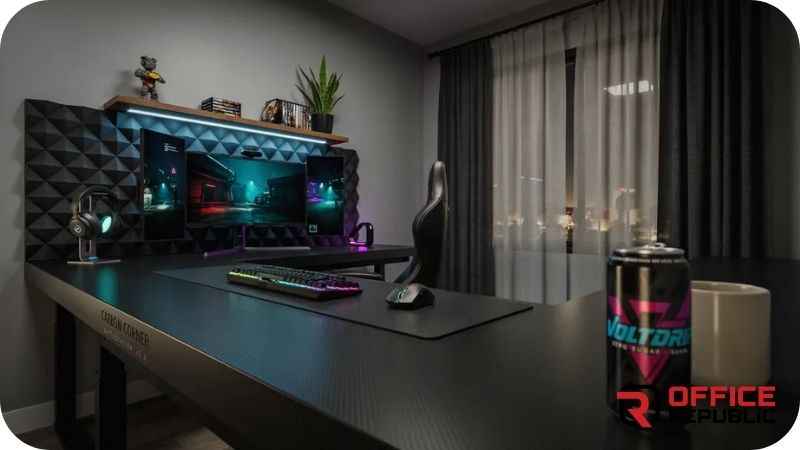
A large L shaped desk in carbon fibre texture black laminate over 18mm MDF, with a full-length cable management tray running under both arms and a raised monitor shelf on the primary arm.
Best For: Triple monitor gaming setups, streamers, competitive gamers.
Materials: 18mm MDF, carbon laminate, steel leg frame, cable tray
Dimensions: 160×140cm, 75cm height
Price Range: PKR 55,000–80,000
Pros: Aggressive gaming aesthetic, cable management built in, very stable MDF core.
Cons: Carbon texture shows fingerprints, heavy to move once assembled.
2. The White Steel Phantom Desk
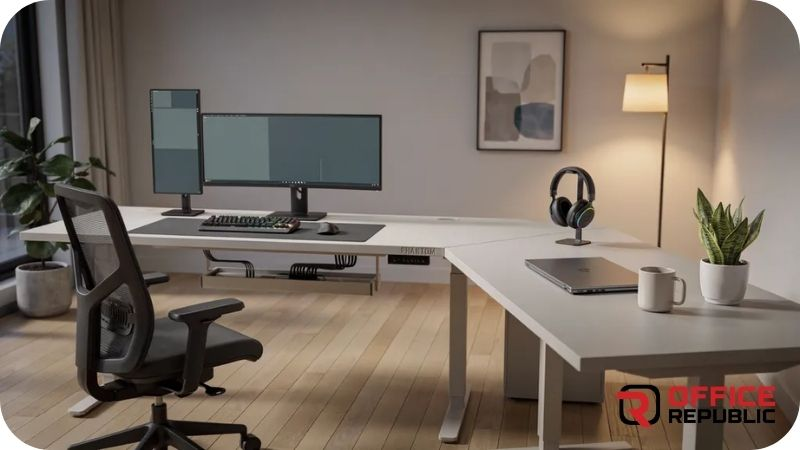
An all-white L shaped desk with a steel powder-coated frame, white MDF surface, and integrated LED strip channel under the desktop edge. Clean, minimal, and very photogenic for streaming backgrounds.
Best For: Streamers, content creators, gamers who want a bright aesthetic.
Materials: White powder-coated steel frame, white laminate MDF top, LED channel
Dimensions: 140×120cm, 75cm height
Price Range: PKR 48,000–72,000
Pros: Very clean look on camera, LED strip gives atmosphere, steel frame is strong.
Cons: White surfaces require regular cleaning, LED channel adds cost.
3. The Drawer Commander Setup
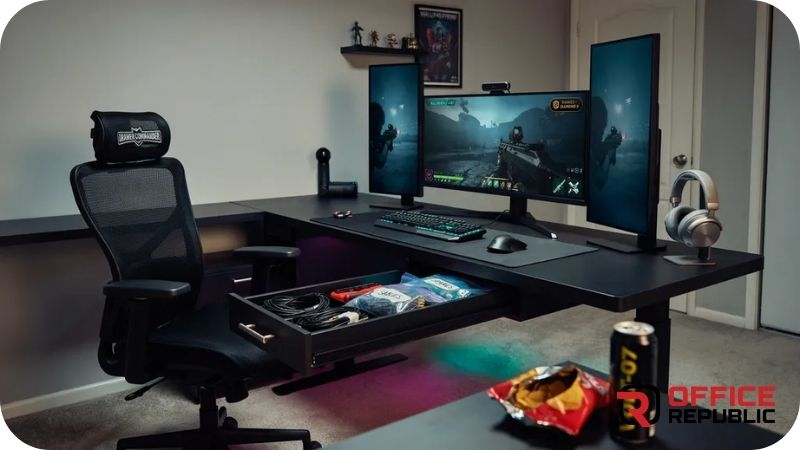
An L shaped desk with a three-drawer pedestal built into the corner section and one additional shallow drawer on the secondary arm. Maximum desk storage without a separate unit.
Best For: Gamers who hate desktop clutter, setups with multiple controllers and accessories.
Materials: 18mm MDF, black matte laminate, full-extension drawer runners
Dimensions: 150×130cm, 75cm height
Price Range: PKR 58,000–85,000
Pros: Excellent built-in storage, full-extension drawers, clean desktop result.
Cons: Drawer unit adds weight to the corner section, not suitable for very small rooms.
Expert Tip
If you are adding drawers to an L shaped gaming desk, always put the drawer unit on the non-dominant side. Your dominant hand side needs full leg clearance for comfortable seating. A drawer pedestal on the wrong side forces you to sit off-centre and causes hip and lower back strain over long sessions.
4. The RGB Hutch Commander
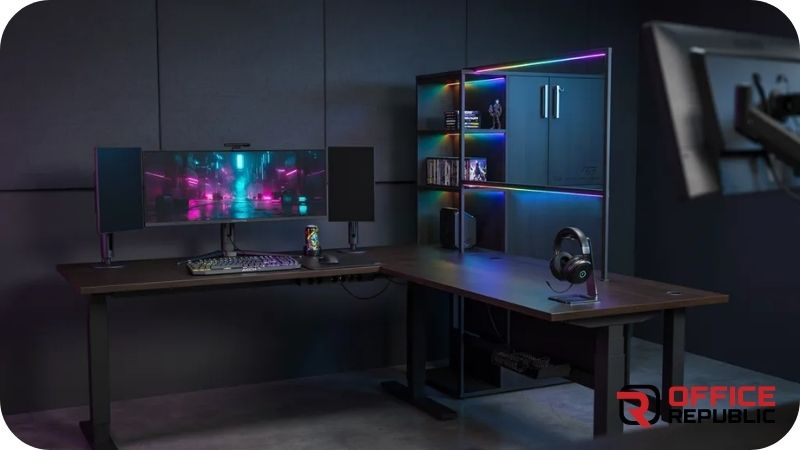
A large L desk with a full hutch (raised shelf unit) above the primary arm — housing monitors, speakers, and LED lighting strips. The secondary arm stays flat and open for working space.
Best For: Multi-monitor setups, gamers who want vertical organisation.
Materials: 18mm MDF, black laminate, hutch with integrated RGB LED strip, steel legs
Dimensions: 160×120cm desk + hutch 160cm wide × 45cm deep × 40cm tall
Price Range: PKR 65,000–95,000
Pros: Keeps monitors elevated, adds vertical display space, RGB creates atmosphere.
Cons: Hutch makes the desk feel enclosed, not everyone prefers the aesthetic.
5. The Compact Corner Starter
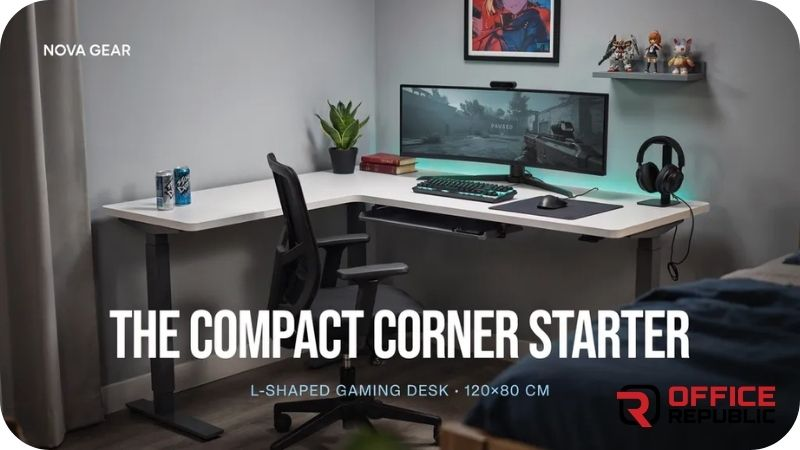
A smaller L shaped desk for rooms where space is genuinely limited. 120×100cm total surface — enough for a single monitor, full keyboard, and one accessory. Entry-level gaming desk that does not sacrifice the corner configuration.
Best For: Bedroom gaming setups, student rooms, first gaming desk buyers.
Materials: 15mm MDF, black or white laminate, painted steel legs
Dimensions: 120×100cm, 75cm height
Price Range: PKR 25,000–40,000
Pros: Budget-friendly, fits small corners, available in black or white.
Cons: Limited surface area, no built-in storage, 15mm MDF is less rigid under heavy monitors.
6. The Sit-Stand Gaming Corner
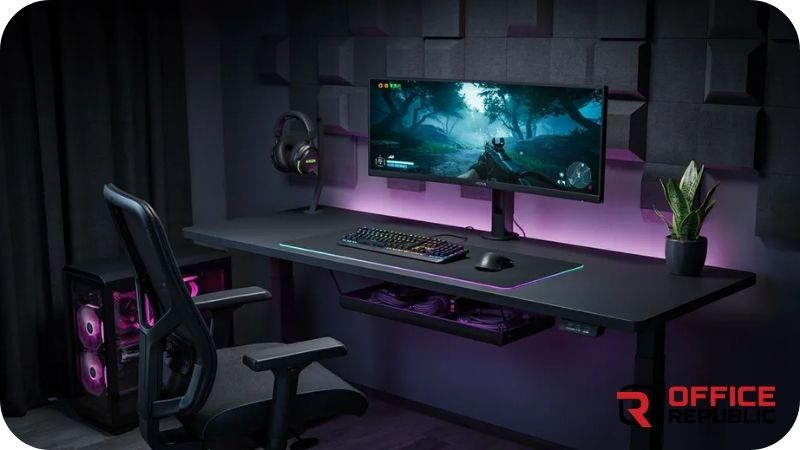
An L shaped desk with electric height adjustment on both arms — rises from 70cm to 120cm allowing sitting and standing configurations. Premium option that is genuinely beneficial for 8+ hour gaming or work sessions.
Best For: Health-conscious gamers, work-from-home gamers who spend very long hours at the desk.
Materials: Steel height-adjustable frame with dual motor, MDF surface panels
Dimensions: 140×120cm, adjustable 70–120cm height
Price Range: PKR 95,000–150,000
Pros: Genuine health benefit, dual motor is smooth and reliable, worth the premium for long-term use.
Cons: Most expensive option, motors require occasional maintenance.
The Chair Matters Just as Much
Best Ergonomic Office Chairs — Find the Right Pair for Your L Desk
7. The Minimalist Oak Grain Corner
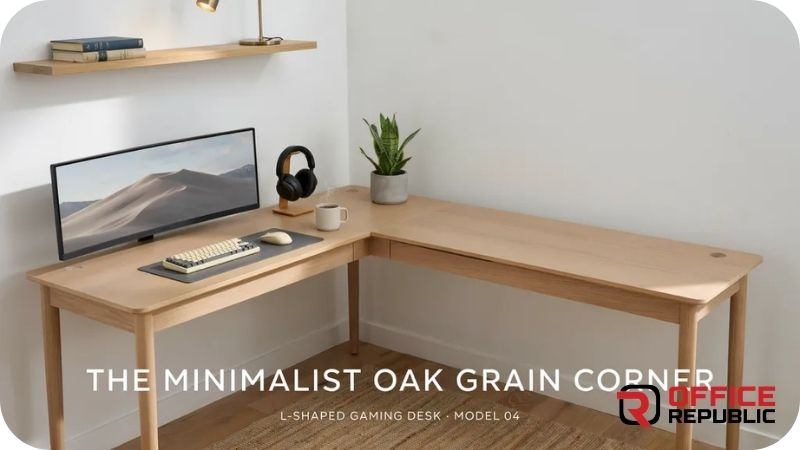
An L shaped desk with a warm oak grain laminate finish — deliberately non-gaming in appearance. Suits home offices that double as gaming spaces without looking like a gaming setup to guests or on video calls.
Best For: Professionals who game, home offices with a traditional or warm aesthetic.
Materials: 18mm MDF, oak grain laminate, matte black steel legs
Dimensions: 140×120cm, 75cm height
Price Range: PKR 38,000–58,000
Pros: Professional look, warm aesthetic, works in any room style.
Cons: No gaming aesthetic features, not suitable for clients who want an obviously gaming desk.
8. The Triple Monitor Command Desk
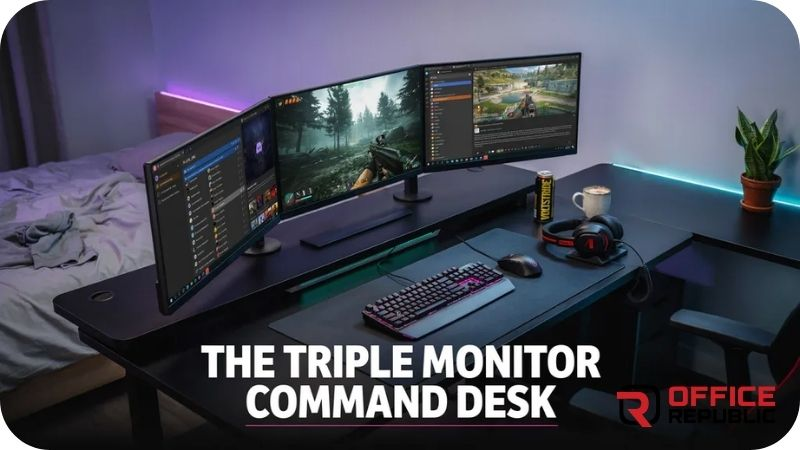
Specifically proportioned for triple monitor setups. Extra-wide primary arm (160cm) gives enough horizontal run for three monitors in a slight arc. Corner section acts as the keyboard and mouse zone.
Best For: Competitive gamers, sim racers, flight simulators, any triple screen configuration.
Materials: 25mm MDF primary surface (extra rigidity for monitor weight), steel frame
Dimensions: 160×140cm, 75cm height
Price Range: PKR 70,000–100,000
Pros: Proportioned specifically for triple monitors, 25mm top is very rigid, generous secondary arm.
Cons: Large footprint — needs at least a 3.5×3.5m room to sit comfortably.
9. The Floating Corner Shelf Desk
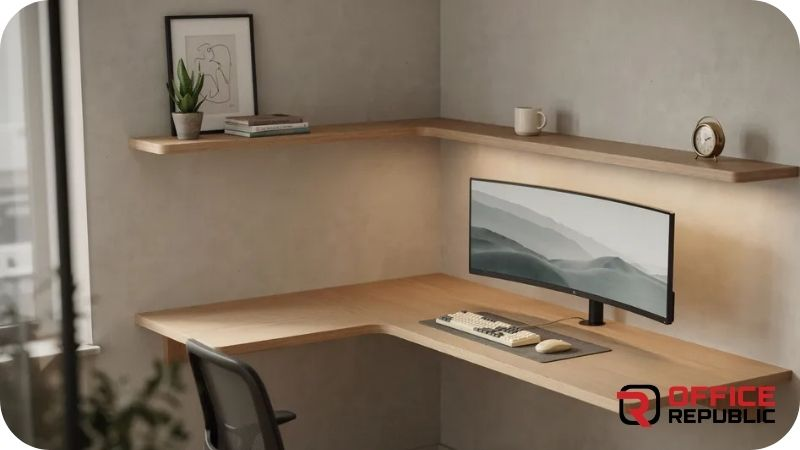
An L shaped desk with a floating monitor shelf built directly into the corner section — raising monitors above the desk surface to eye level while freeing the desk surface below for keyboard, mouse, and accessories.
Best For: Dual monitor gamers who want monitors at the exact right eye height without a separate monitor arm.
Materials: 18mm MDF, carbon or matte black laminate, floating shelf with concealed brackets
Dimensions: 140×120cm desk, floating shelf 60×25cm
Price Range: PKR 45,000–68,000
Pros: Monitors at correct height, frees desk surface, clean integrated look.
Cons: Shelf height is fixed — not adjustable after installation.
Expert Tip
Monitor height on an L shaped desk should place the top of the screen at or just below eye level when you are seated upright. If you are building custom or choosing a hutch/shelf height, measure from the floor to your seated eye level first. Most people’s seated eye level is 110–125cm — use this number to set your monitor surface height, not the desk surface height.
10. The Cable Management Fortress
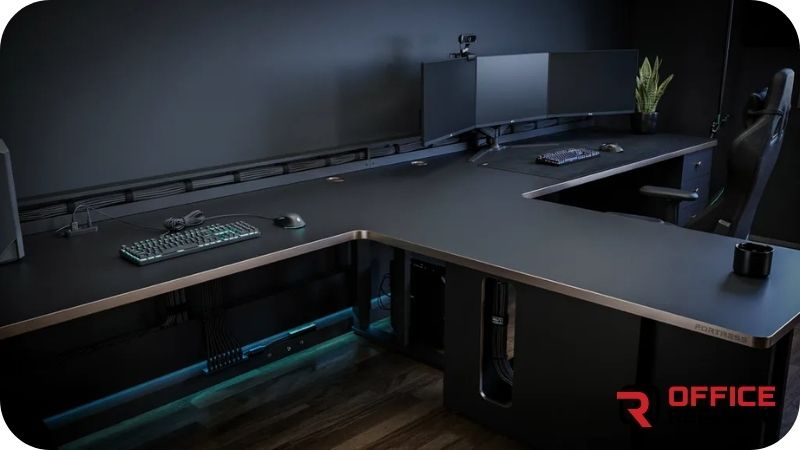
An L shaped desk where the entire underside is engineered for cable management — a full-width cable tray under both arms, routing holes every 40cm, velcro cable bundles, and a built-in power strip mounting point. The desktop itself has no visible cables at all.
Best For: Perfectionists, streamers who show their setup, professional content creators.
Materials: 18mm MDF, matte black laminate, steel cable tray, grommets at each routing point
Dimensions: 150×130cm, 75cm height
Price Range: PKR 60,000–88,000
Pros: Completely clean desktop, professional appearance, power strip always accessible.
Cons: More complex to build, routing cables initially takes time and patience.
11. The Side Drawer Workstation
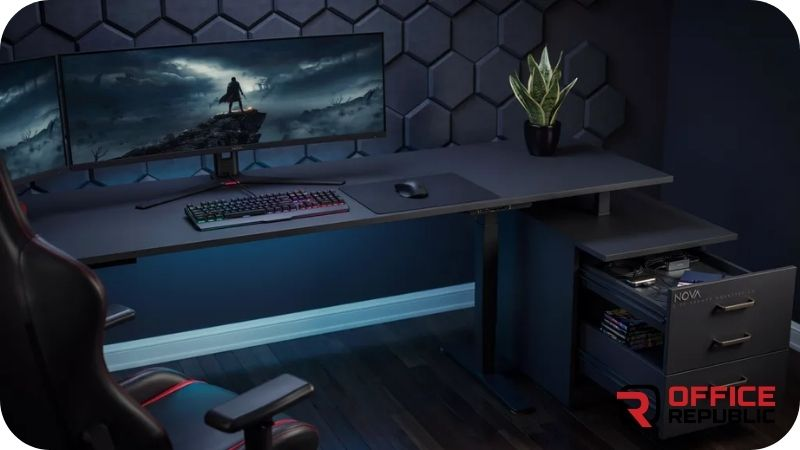
An L shaped desk with a two-drawer side pedestal on the secondary arm — designed for gamers who also work from the same desk and need document storage alongside their gaming accessories.
Best For: Work-from-home gamers, students who game on the same desk they study.
Materials: 18mm MDF, black or white laminate, soft-close drawer runners
Dimensions: 140×120cm, 75cm height
Price Range: PKR 50,000–75,000
Pros: Dual purpose storage, soft-close drawers are a premium feel at mid-range cost.
Cons: Secondary arm is partially blocked by the pedestal — less open leg room on that side.
When the Whole Room Is the Setup
Walk-In Closet Office Ideas — Turning Any Space Into a Gaming Room
12. The RGB Under-Glow Desk
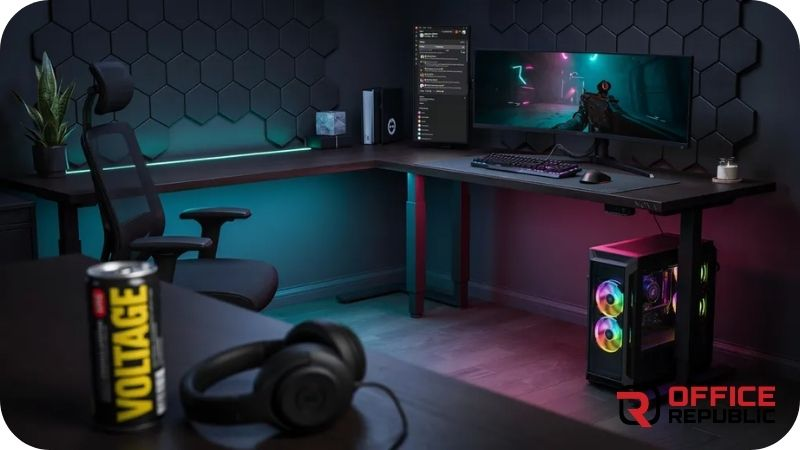
An L shaped desk with a full perimeter RGB LED strip running along the underside edge of both desk arms — creating a coloured glow on the floor beneath. The effect is dramatic in a dark room and completely hidden in daylight.
Best For: Gamers focused on room aesthetics, streamers, YouTube setup tour content creators.
Materials: 18mm MDF, matte black or dark grey laminate, addressable RGB LED strip with controller
Dimensions: 140×120cm, 75cm height
Price Range: PKR 42,000–65,000
Pros: High visual impact at relatively low additional cost, LED strip is replaceable if it fails.
Cons: Floor glow shows dust and debris under the desk, requires regular floor cleaning beneath.
13. The Pegboard Back Panel Desk
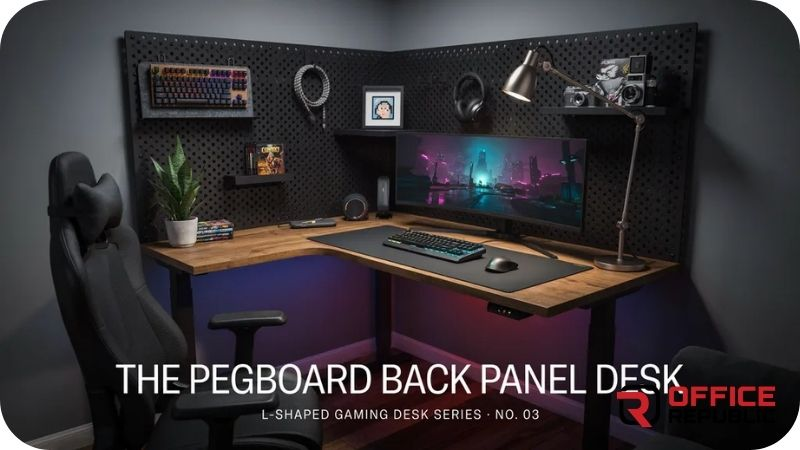
An L shaped desk with a full pegboard panel rising above the secondary arm — allowing hooks, small shelves, controller mounts, headset hooks, and accessories to be arranged and rearranged freely.
Best For: Gamers with many accessories, streamers who want a visual background, people who like their gear on display.
Materials: 18mm MDF desk, metal or MDF pegboard panel, steel legs, pegboard hooks
Dimensions: 140×120cm desk, pegboard 80cm wide × 80cm tall
Price Range: PKR 48,000–72,000
Pros: Eliminates desktop clutter without drawers, fully reconfigurable, very photogenic background.
Cons: Pegboard collects dust in every hole, items fall if hooks are poor quality.
14. The Reversible Corner Modular Desk
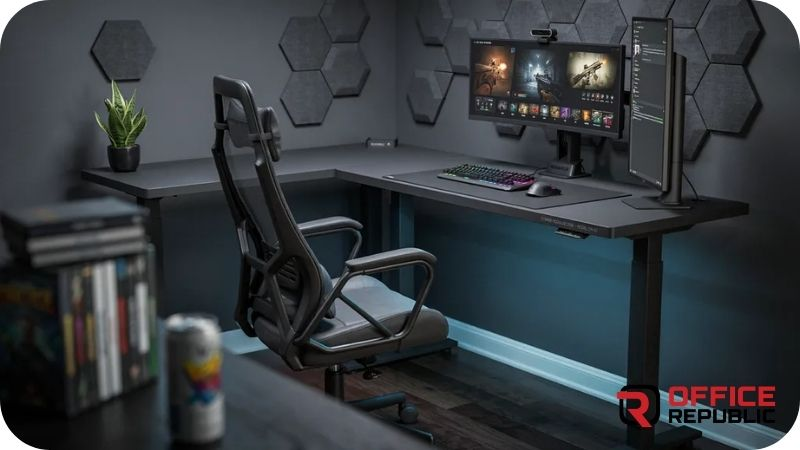
A modular L shaped desk system where individual panels clip together — meaning the corner orientation can be changed after assembly. Left-hand setup today, right-hand setup if you move rooms next year.
Best For: Renters, gamers who move frequently, anyone unsure of their ideal room configuration.
Materials: 18mm MDF panels with modular connectors, steel frame
Dimensions: 120×120cm to 160×140cm depending on configuration
Price Range: PKR 45,000–78,000
Pros: Fully reversible, reconfigurable, modular panels are individually replaceable.
Cons: Modular joints are the weakest point — quality varies significantly between manufacturers.
Long Sessions Need More Than a Good Desk
Best Lumbar Support Office Chairs — Support Your Back at the Gaming Desk
15. The Full Wall Command Centre
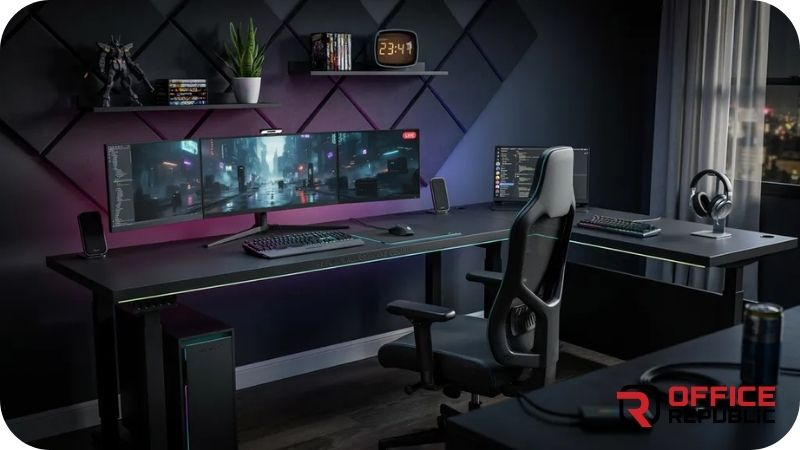
An extra-large L shaped desk that spans two full walls of a room — essentially a custom-built continuous desktop surface in an L shape, with wall-mounted shelves above, drawers below, and a full cable management system built into the structure.
Best For: Dedicated gaming rooms, streamers with full professional setups, serious content creators.
Materials: 25mm MDF or plywood, premium laminate, wall-mounted brackets, full cable management
Dimensions: Fully custom — typically 200×180cm+ for full wall-to-wall spans
Price Range: PKR 90,000–180,000
Pros: Maximum surface area, permanent and very stable, storage built into the full wall span.
Cons: Permanent installation, very expensive, requires a dedicated gaming room.
16. The Student Gamer Dual Purpose Desk
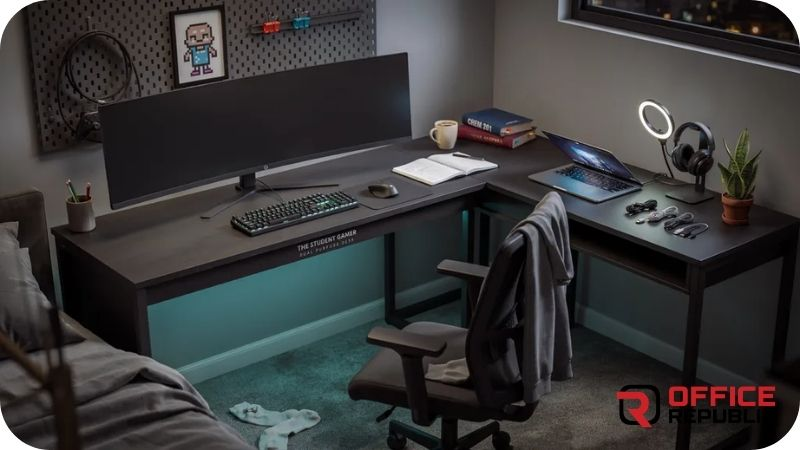
A mid-size L shaped desk proportioned for a student who studies and games from the same desk. One arm for the gaming monitor and controls. The other arm as a clean study surface with a small drawer for stationery.
Best For: Students, bedroom gaming setups, dual study and gaming use.
Materials: 16mm MDF, white or light grey laminate, one drawer unit
Dimensions: 130×110cm, 75cm height
Price Range: PKR 28,000–45,000
Pros: Budget-appropriate for student use, dual function, smaller footprint.
Cons: 16mm MDF is less rigid for very heavy monitor setups.
17. The Esports Team Desk — Tournament Style
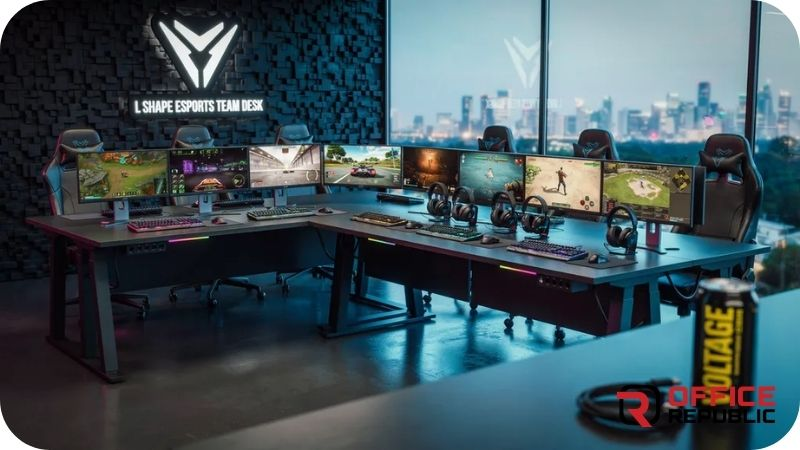
A high-end L shaped desk built to tournament gaming specifications — steel frame, 25mm laminate surface, monitor arm mounting holes pre-drilled in the primary arm, cable routing tray, and leg space clearance designed for competitive posture.
Best For: Competitive gamers, esports team setups, anyone replicating a professional tournament station.
Materials: Steel frame, 25mm MDF top, pre-drilled monitor arm mounts, cable tray
Dimensions: 150×130cm, 74cm height (tournament standard)
Price Range: PKR 75,000–115,000
Pros: Tournament-specification proportions, monitor arm ready, built for competitive posture.
Cons: Higher cost, no built-in drawers — storage must be separate.
Expert Tip
Pre-drilled monitor arm holes are worth specifying on any custom-built L shaped desk. A monitor arm with an integrated clamp grips the desk surface and eventually marks or cracks the laminate edge over time. A desk with a pre-drilled grommet hole for the monitor arm base is cleaner, more stable, and preserves the desk surface for years longer.
18. The Rustic Reclaimed Wood Gaming Corner
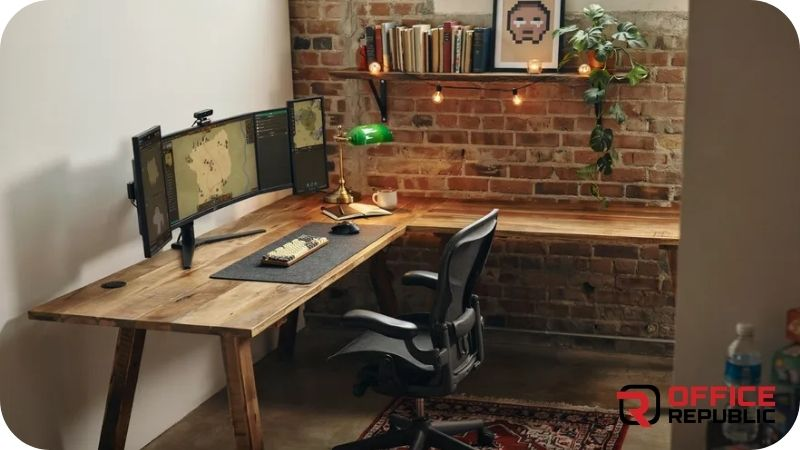
An L shaped desk using reclaimed or solid wood top panels — natural grain, no laminate, sealed with a clear matte finish. Steel black pipe legs for contrast. Warm, characterful, and completely different from every other gaming desk in the room.
Best For: Gamers with a rustic, industrial, or Japandi interior aesthetic.
Materials: Reclaimed or solid sheesham top, black powder-coated pipe legs, matte clear seal
Dimensions: 140×120cm, 75cm height
Price Range: PKR 65,000–110,000
Pros: Genuinely unique appearance, very durable wood surface, no two desks look identical.
Cons: Wood grain varies — cannot guarantee a specific look, heavier than MDF equivalent.
19. The Monitor Arm Ready Minimalist L
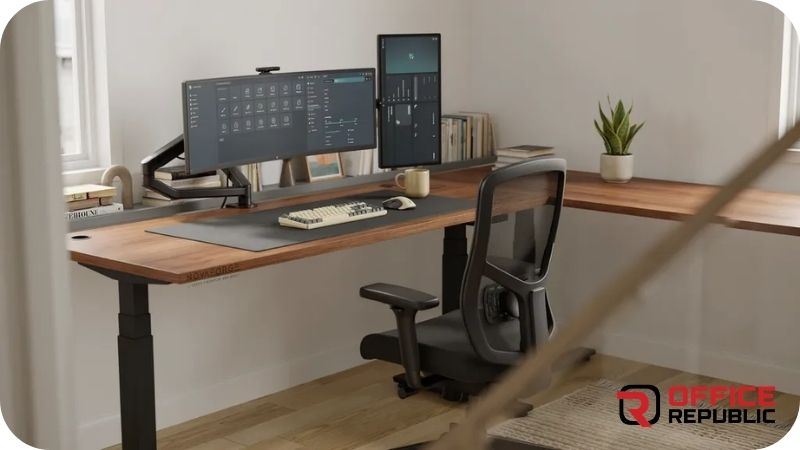
A clean, flat L shaped desk with no hutch, no shelves, and no drawers — just a strong, flat surface optimised for monitor arms. The surface has a pre-drilled grommet hole at the primary arm corner and cable routing at the rear. Everything is on the arms, nothing is built in.
Best For: Gamers who prefer full monitor arm setups and want maximum desk clearance.
Materials: 25mm MDF, matte black or white laminate, grommet hole, rear cable exit
Dimensions: 140×120cm, 75cm height
Price Range: PKR 38,000–60,000
Pros: Maximum desk surface clear, monitor arms create ideal screen height, very clean aesthetic.
Cons: Requires purchasing separate monitor arms and storage — total cost rises.
20. The Pakistan Custom-Built L Desk (Local Fabrication)
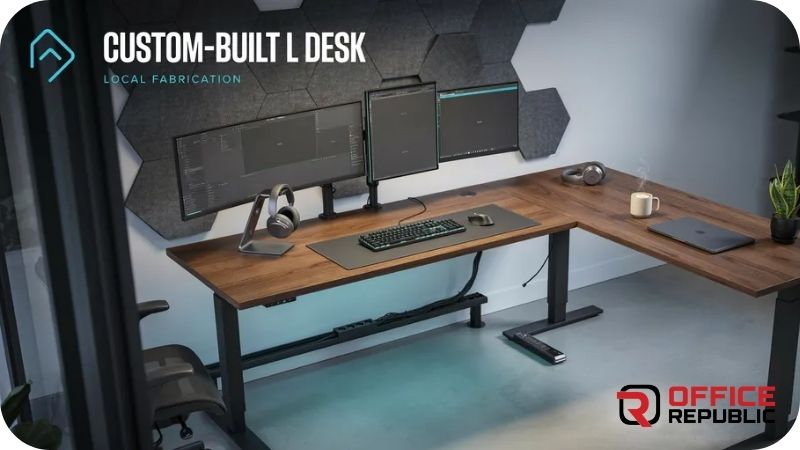
A fully custom L shaped gaming desk designed and built locally in Pakistan to exact room dimensions, chosen material, and specific features — drawer count, cable management, LED channels, surface texture, leg style, and corner radius all specified by the client.
Best For: Anyone with non-standard room dimensions, specific requirements, or wanting exact aesthetic control.
Materials: Fully specifiable — MDF, plywood, or solid wood; any laminate; steel or wood legs
Dimensions: Fully custom
Price Range: PKR 35,000–180,000 depending on specification
Pros: Exact fit to room, full specification control, often better value than imported equivalents.
Cons: Lead time of 2–3 weeks, quality entirely depends on the manufacturer chosen.
How Do You Manage Cables on an L Shaped Gaming Desk?
Cable management is the most common afterthought in gaming desk setups — and the one thing that separates a setup that looks great from one that looks like a cable explosion.
Cable trays: A steel or plastic mesh tray mounted under the desk surface holds power strips, cable bundles, and excess slack out of sight. These mount with screws or adhesive clips and are the single most effective cable management solution for any desk.
Grommet holes: Holes through the desk surface with a rubber or plastic grommet allow cables to drop from the desk top to the cable tray below without running across the surface edge. Every custom L desk should have at least two — one on the primary arm near the monitor position, one at the rear corner.
Velcro cable ties: Never use zip ties for permanent cable management on a desk — they make future changes very difficult. Velcro cable ties allow bundles to be opened, adjusted, and rebundled without cutting. Use them throughout your under-desk cable routing.
Power strip placement: Mount the power strip to the underside of the cable tray or the desk leg — never leave it on the floor where it collects dust and pets can reach it. A screwed-on mounting bracket for the power strip costs nothing and makes the whole setup much cleaner.
Protect the Floor Under the Desk Too
5 Best Floor Mats for Office Chairs — Gaming Setup Floor Protection
What Is the Weight Capacity You Need for a Gaming Desk?
Most standard L shaped gaming desks have a listed weight capacity of 50–80kg. That sounds like a lot — until you add it up.
A 32-inch monitor weighs 6–9kg. Three of them is 18–27kg. Add a PC tower at 8–12kg, two speakers at 3–5kg each, a microphone arm and accessories at 2–3kg, and you are looking at 35–50kg of equipment before anything else touches the desk.
For setups with three monitors plus a tower PC on the desk surface, specify a desk with a minimum 80kg capacity and a 25mm thick surface. Thinner surfaces deflect under sustained load and the deflection — while small — causes monitors to sit at slightly different heights and creates vibration during gaming that is surprisingly distracting.
What Are the Best L Shaped Gaming Desks for Dual and Triple Monitor Setups?
Dual Monitor Setup Requirements
Minimum primary arm width of 130cm. This gives enough horizontal run for two monitors side by side with space between them and a keyboard tray in front. Desk depth of 65–70cm places monitors at the correct focal distance.
Triple Monitor Setup Requirements
Primary arm minimum 160cm wide. The three monitors in a slight arc configuration need approximately 140–150cm of linear space, and you need clearance on each side. A 25mm thick surface is strongly recommended to handle the combined monitor weight without deflection.
Monitor Arm vs Fixed Stand on an L Desk
Monitor arms are significantly better than fixed stands on L shaped desks. They allow you to adjust monitor height, tilt, and distance independently for each screen. On an L desk, the corner monitor on a triple setup almost always needs to be at a slightly different angle — a monitor arm makes this simple. A fixed stand cannot.
Your Chair Needs to Match the Setup
Best High Back Office Chairs — Full Support for Long Gaming Sessions
Custom Built vs Ready-Made — Which L Shaped Gaming Desk Is Worth It in Pakistan?
This is a question I get from almost every client considering an L shaped gaming desk for the first time. The answer depends on your room dimensions, your specification, and your timeline.
Ready-made imported L desks are available online through various Pakistani retailers. They are typically 120×120cm or 140×120cm in fixed dimensions, come in limited configurations, and ship with standard features. Lead time is 1–5 days. The main risk is that the dimensions may not fit your specific corner correctly and the quality of materials is difficult to verify before arrival.
Custom-built local L desks are fabricated by furniture manufacturers to your exact dimensions and specification. Every feature — drawer count, cable management routing, surface thickness, leg style, LED channel, grommet hole positions — is your decision. Lead time is 10–21 days. The main risk is choosing a manufacturer who does not have experience with gaming desk builds specifically.
For rooms with standard-size corners, a ready-made desk is fine. For rooms with unusual dimensions, specific aesthetic requirements, or complex gaming setups, a custom local build is almost always better value at equivalent or lower cost.
What Is the Price Range of L Shaped Gaming Desks in Pakistan?
Entry level (120×120cm, 15–16mm MDF, basic laminate): PKR 22,000–38,000
Mid range (140×120cm, 18mm MDF, good laminate, cable management): PKR 38,000–65,000
Mid-premium (150×130cm+, 18–25mm MDF, drawers, LED, cable tray): PKR 65,000–95,000
Premium (full custom, 25mm surface, steel frame, all features): PKR 90,000–150,000
Sit-stand L desk (electric height adjustment, dual motor): PKR 95,000–180,000
The biggest price variable in Pakistani market is surface thickness and leg material. A 15mm MDF desk with painted steel legs versus a 25mm MDF desk with powder-coated steel legs can be PKR 20,000–30,000 difference — and the 25mm version will last significantly longer under daily gaming use.
Comparison — L Shaped Gaming Desks
| Design Type | Budget (PKR) | Durability | Maintenance | Best For | Material |
|---|---|---|---|---|---|
| Compact Corner Starter | 22K–40K | Medium | Low | Students, first desk | 15mm MDF |
| Carbon Corner Battlestation | 55K–80K | High | Medium | Triple monitor, streaming | 18mm MDF + Carbon |
| Drawer Commander | 58K–85K | High | Low | Clutter-free setups | 18mm MDF + Drawers |
| RGB Hutch Commander | 65K–95K | High | Medium | Multi-monitor + aesthetics | MDF + LED + Hutch |
| Sit-Stand Gaming Corner | 95K–150K | Very High | Medium | Health-focused gamers | Steel + Dual Motor |
| Full Wall Command Centre | 90K–180K | Very High | Low | Dedicated gaming rooms | 25mm MDF + Wall Mount |
| Custom Local Build | 35K–180K | Specifiable | Specifiable | Any requirement | Fully Custom |
Pros and Cons of L Shaped Gaming Desks
✓ Advantages
- Uses corner space that is otherwise completely wasted
- Maximises total surface area within a small room footprint
- Creates natural separation between gaming and work zones
- Supports dual and triple monitor setups far better than straight desks
- Corner position feels immersive and focused
- Custom builds available at competitive prices from local manufacturers
- Wide range of configurations — drawers, LED, shelves, sit-stand
✗ Disadvantages
- Corner section is harder to use ergonomically — reach distance is greater
- Requires a suitable corner in the room — not every room has one
- Left vs right configuration must be decided before purchase — hard to change after
- Larger desks are difficult to move without disassembly
- Cheap ready-made versions have poor joint quality at the corner connection
- Cable management at the corner section needs careful planning
Case Study — Esports Team Room, DHA Lahore
Client Situation: A five-person esports team in DHA Lahore was upgrading from folding tables to a proper gaming room. They needed five L shaped gaming desks in a room of approximately 6×8 metres, each supporting dual monitors and a gaming PC tower.
Challenge: The room dimensions meant each desk needed to be compact — maximum 130×110cm — to allow five setups with adequate space between them. Standard imported desks at this size had poor quality corner connections that wobbled under load. Budget was PKR 280,000 for all five desks combined — PKR 56,000 per desk.
Solution: Five custom L shaped desks built locally at 130×110cm with 18mm MDF tops, carbon fibre laminate finish, powder-coated black steel frames, an integrated cable tray under each primary arm, and a single drawer pedestal on each secondary arm. Corner connections were steel-reinforced box joints — significantly stronger than the dowel-and-cam connectors used in most ready-made desks.
Materials Used: 18mm MDF, carbon laminate, powder-coated steel frame and legs, steel cable tray, one drawer pedestal per desk.
Budget: PKR 52,000 per desk — PKR 4,000 under budget per unit.
Result: All five desks were delivered and assembled in one day. The team used them for six months of daily 8–10 hour sessions with no joint movement, no surface deflection, and zero maintenance issues. One team member specifically requested a matching standalone monitor shelf at month three — added in one day.
Lesson: For multiple matching units, custom local builds are almost always cheaper per unit than imported equivalents — and the quality at this price point is significantly higher when you specify correctly.
Complete the Team Setup
Best Fabric Office Chairs — Breathable Chairs for Long Gaming Sessions
Buying Guide — What to Check Before You Buy an L Shaped Gaming Desk
Eight Things to Confirm Before You Order
- 1 Confirm the actual dimensions — not just the listed size Many sellers list the primary arm length only. Ask for both arm lengths, the corner section depth, and the total footprint including legs. A 140cm desk can mean very different things from different sellers.
- 2 Check surface thickness 15mm MDF is adequate for light setups. 18mm is the standard for gaming desks. 25mm is what you need for triple monitors or a PC tower on the surface. Thickness determines rigidity and long-term durability under load.
- 3 Ask about the corner joint type The corner connection is the most stressed point on an L shaped desk. Dowel and cam connector joints (used in most flat-pack desks) loosen over time. Steel bracket-reinforced or box joint corners are significantly stronger. Ask specifically.
- 4 Confirm left or right orientation before ordering An L shaped desk is not symmetrical. Once it arrives, you cannot flip it. Confirm from the product images which arm is on which side when standing facing the desk — and match this to your specific room corner layout.
- 5 Check weight capacity against your actual equipment Add up your monitor weights, PC tower, speakers, and all accessories. Compare this number to the desk’s listed weight capacity. Allow 20% headroom — a desk operating near its weight limit will deflect and degrade faster.
- 6 Plan cable management before the desk arrives Decide where your PC tower will sit, where cables will run, and where your power strip will be mounted before assembly. Retrofitting a cable tray after the desk is assembled is significantly harder than planning it during setup.
- 7 Measure the door and stairwell before delivery Large L shaped desks — especially 160cm+ arm lengths — often cannot be brought through a standard door fully assembled. Most are delivered flat-pack. Confirm assembly requirements and whether the seller provides assembly or not.
- 8 Consider long-term value over upfront cost A PKR 25,000 desk that needs replacing in 18 months costs more than a PKR 55,000 desk that lasts 8 years. For daily gaming use, the surface condition and joint integrity are what fail first on cheap desks — and both are direct results of material quality and corner joint type.
How to Set Up Your L Shaped Gaming Desk Correctly
Step 1: Position the Desk Before Bringing Equipment In
Place the empty desk in the corner first. Sit in your gaming chair inside the desk position and physically reach every part of the surface — the far corner, both arm ends, and the area directly in front of where your monitors will sit. Adjust position now before anything is plugged in.
Step 2: Route All Cables Before Placing Equipment
Run your power strip cable, monitor cables, PC power cable, and peripheral cables through any grommet holes or cable trays before placing monitors or the tower. A cable tray that is half full of equipment is almost impossible to thread new cables through cleanly. Route first, place equipment second.
Step 3: Position Monitor at Correct Height and Distance
The top of your primary monitor should be at or just below seated eye level. Typical distance from eyes to screen for a 27-inch monitor is 60–75cm — your desk depth should make this achievable naturally from your seated position. Adjust monitor arm or stand height before mounting the second or third monitor.
Step 4: Set Chair Height Relative to Desk — Not the Other Way
Your desk height is fixed. Your chair height adjusts. Set the chair so your elbows rest naturally at desk surface height when your upper arms hang straight down. Your forearms should be roughly horizontal when typing. This is the correct ergonomic relationship — adjust the chair to the desk, not the other way around.
Step 5: Organise the Secondary Arm as a Dedicated Zone
Do not treat the secondary arm as overflow space for the primary. Assign it a specific function — streaming controls and reference monitor, document and notebook space, or secondary gaming console controls. A secondary arm with a defined purpose is used effectively. One used as general overflow becomes a clutter zone within a week.
Make the Chair as Comfortable as the Desk
Best Cushions for Office Chairs — Comfort Upgrade for Long Sessions
Frequently Asked Questions
What is the best L shaped gaming desk for a small room?
For small rooms, the best L shaped gaming desk is between 120×120cm and 130×110cm — compact enough to fit most bedroom corners while still providing genuine dual-surface functionality. The Compact Corner Starter and Student Gamer Dual Purpose designs work best. Avoid any desk wider than 140cm per arm in a room smaller than 3×3 metres as the setup will feel claustrophobic.
What size L shaped gaming desk do I need for dual monitors?
For a dual monitor setup, you need a minimum primary arm width of 130cm and a desk depth of 60–65cm. Two standard 27-inch monitors side by side require approximately 120cm of horizontal space. This leaves enough clearance on each side and adequate depth to keep monitors at the correct focal distance from your seated position.
Is an L shaped gaming desk better than a straight desk?
For setups with more than one monitor, an L shaped desk is significantly better. It gives you more total surface area in the same room footprint, uses corner space that a straight desk ignores, and creates natural zones for different activities. For single monitor setups in small rooms, a straight desk can be equally functional — the advantage of the L shape grows with the complexity of the setup.
What material is best for an L shaped gaming desk in Pakistan?
18mm MDF with a quality laminate is the best all-round choice for Pakistani conditions. It is stable, handles humidity better than solid wood without treatment, takes a perfect finish, and is strong enough for all but the heaviest setups. For setups with triple monitors or a PC tower on the surface, specify 25mm MDF or commercial plywood for extra rigidity.
Can I build a custom L shaped gaming desk in Pakistan?
Yes. Local furniture manufacturers across Lahore, Karachi, Faisalabad, and other cities can fabricate custom L shaped gaming desks to exact dimensions and specifications. Custom builds typically offer better material quality and stronger corner joints than equivalent-priced ready-made imported desks. Lead time is usually 10–21 days. OfficeRepublic specialises in this and provides a free consultation before any work begins.
What is the correct desk height for a gaming desk?
Standard gaming desk height is 72–75cm. This suits users between approximately 165–185cm tall. If you are shorter than 165cm, consider a 70cm height. If you are taller than 185cm, a 78–80cm height is more comfortable. For exact fit, measure from the floor to your bent elbow while seated in your gaming chair — that measurement is your ideal desk height.
What is the weight capacity I need for my gaming desk?
Add up the weight of all equipment that will sit on the desk surface — monitors, PC tower, speakers, accessories. Most single-monitor setups with a PC are under 25kg. Dual monitor setups are typically 30–45kg. Triple monitor setups with a full-size tower can reach 50–60kg. Choose a desk rated at least 20% above your calculated total, and specify a 25mm surface for anything above 50kg.
Do L shaped gaming desks come with LED lights built in?
Some ready-made L shaped gaming desks include LED strips in the design — usually running under the desk surface edge or inside a monitor hutch. Most custom-built desks can have an LED channel added during fabrication at a modest additional cost. Alternatively, a separate adhesive RGB LED strip can be added to any desk after purchase for PKR 2,000–5,000.
What is the difference between L shaped gaming desks with drawers and without?
Desks with drawers have built-in storage for controllers, cables, accessories, and documents — keeping the desktop surface clear. Desks without drawers have more open leg room and are easier to build at lower cost. For gamers with many accessories and a clean desk aesthetic preference, drawers are worth the additional cost. For minimalist setups, drawer-free is perfectly functional.
Where can I buy or custom-build an L shaped gaming desk in Lahore?
OfficeRepublic at Office No. 7-8, Extension Cantt, Lahore builds custom L shaped gaming desks to any specification and dimension. Bring your room measurements and a list of your equipment — we can design and fabricate the exact desk your setup needs. Call 0321 9643535 or visit the showroom for a free consultation and quote.
html
<a href="https://officerepublic.pk/closet-desk-ideas/" style="display:block;text-decoration:none;border:1px solid #e0e0e0;border-radius:8px;padding:18px 20px;background:#ffffff;box-shadow:0 2px 8px rgba(0,0,0,0.06);margin:24px 0;">
<p style="font-family:Arial,sans-serif;font-size:11px;font-weight:700;letter-spacing:1px;text-transform:uppercase;color:#CE2027;margin:0 0 6px 0;">No Corner Available? Try This Instead</p>
<p style="font-family:Arial,sans-serif;font-size:15px;font-weight:700;color:#1E1E1E;margin:0;line-height:1.4;">Closet Desk Ideas — Alternative Gaming Setups for Any Room</p>
</a>
⭐⭐⭐⭐⭐ 4.9 Rating · 64 Google Reviews
Ready to Build Your Perfect L Shaped Gaming Desk?
Bring your room dimensions and equipment list. We design and fabricate custom L shaped gaming desks to exact specification — free consultation before any work begins.
📍 Office No. 7-8, Extension Cantt, Lahore 54791
📞 0321 9643535
✉ creativesolutionspk@gmail.com
🌐 officerepublic.pk